
Resources · Use cases
Make the work visible, from design to training.
NEURAX is built primarily for universities and companies worldwide: for teaching, research and internal model development. Students, educators and independent builders can use it too. These scenarios show where the Studio can save routine effort and leave reviewable evidence—and where a person still needs to decide.
Representative scenarios, not customer case studies. You provide a supported local dataset already processed for its task, with targets or labels prepared when needed. NEURAX uses it for model analysis and training; data preparation and cleaning happen before import.
In the working day
One workflow, from the first sketch to the training plan and reviewed run
The Studio makes the model, the data, the target machine and the approval visible in one project. You can start from a real public model on Hugging Face or ModelScope; its supported architecture is reconstructed from its public configuration, while checkpoint weights are not downloaded.
Describe the task in plain language
State the goal, expected output, labels and constraints. The optional Studio Agent can help turn that brief into a supported first architecture; you can also start from a blank canvas, a template or a public model configuration.
Design on the canvas
Connect supported blocks, inspect their parameters and set run options in Hyperparameters. Or import a real Hugging Face or ModelScope model configuration to inspect and analyze its supported architecture; the import does not include checkpoint weights.
Select the prepared data
Choose a supported local file or folder that your team has already processed for the task, plus the target machine. NEURAX reads its profile—such as sample and class counts—and uses it to analyze the design and training plan; it does not prepare the dataset for you.
Analyse and simulate
Check exact parameter and operation counts where supported; compare estimated memory, duration and cost. Simulation shows the estimate by layer and precision.
Project the plan over time
In Time Machine, set annual training runs, data growth, the planning horizon, hardware and a budget. Compare yearly training cost, duration, energy and CO₂; these projections cover training, not inference or serving.
Review and approve
Read the Decision brief: design, data, machine, budget, unknowns and risks. Fix a mismatch, or record a human decision before a run.
Approve, train, inspect, export
After a person approves the plan in Decision, start the local run in Training. Follow its loss, throughput and memory, inspect validation results, logs and checkpoints, then export the resulting project and model files for review or reuse.
In the working day
Ten concrete use cases for teams and independent builders
Each scenario names the routine friction first, then follows the concrete Studio actions and the evidence the team can take away.
University · teaching
A neural-network lab where students can see why a design changes
The situation
A lecturer has a small campus-energy table already processed for classification, with its target column ready, and wants students to compare a shallow network with a wider one.
Where time or resources get lost
Without a shared visual model, class time can disappear into setup, disconnected code examples and trial runs that fail before anyone understands why.
A practical NEURAX workflow
- Open a template or assemble the supported blocks on the canvas; inspect what each layer does.
- Select the prepared local CSV and review the profile, target classes and proposed validation split.
- Compare the designs in Analysis and Simulation; approve a small training pilot only after reviewing the machine and estimate.
What the team gets
Students can connect architecture choices to parameter counts and estimated memory, then discuss validation loss and the limits of the result.
Useful record: A saved design, a Decision brief and, if the pilot completes, run metrics and checkpoint files.
University lab or independent builder · research prototype
A bounded prototype before a lab commits a machine
The situation
A lab researcher or independent builder wants to explore whether labeled microscope or plant images can support a narrowly defined classification experiment.
Where time or resources get lost
A researcher can spend a day adapting code or queue a model that exceeds the workstation's memory before checking whether the prepared experiment is feasible.
A practical NEURAX workflow
- Select the already processed and labeled images in the supported class-folder layout; review their profile and split.
- Build or compare a supported CNN and inspect the resource report on the actual lab machine.
- Treat training as a small feasibility pilot; inspect validation behavior before deciding whether to pursue a larger study.
What the team gets
The team gets an architecture and data profile it can discuss, plus an early indication of whether the chosen local machine is suitable.
Useful record: The project design, profile and proposal record make the setup easier to review or reproduce.
University or company · model selection
Inspect a real Hugging Face or ModelScope model before requesting compute
The situation
A research group finds a published model that may suit its task, but needs to understand its supported architecture and whether it is plausible on the lab workstation before reserving GPU time.
Where time or resources get lost
Reading configuration files by hand, rebuilding layers in a separate notebook and guessing memory needs can consume hours—and still leave the team unsure whether it compared the same model.
A practical NEURAX workflow
- In Import, enter the public Hugging Face or ModelScope model ID or URL; NEURAX fetches its supported public configuration and reconstructs the architecture on the canvas.
- Review the imported blocks and any assumptions, then analyze parameter and operation counts and compare estimated memory with the selected machine.
- Save the design and Decision brief to compare candidates or adjust supported architecture settings before planning a local pilot.
What the team gets
The team can discuss a real published architecture using a shared, inspectable design and a hardware-aware estimate before asking for resources.
Useful record: The imported design, its stated assumptions and the analysis or Decision record preserve what was compared. This import does not bring the model's learned checkpoint weights into NEURAX.
University or company · Agent-assisted design
Turn a plain-language requirement into a model draft the team can inspect
The situation
An engineer can say, “Classify these labeled support tickets locally and keep the model small,” but still loses time translating that brief into blocks and checking each version by hand.
Where time or resources get lost
Repeatedly moving between a written request, model examples, parameter fields and compiler errors makes it easy to miss a constraint or spend time polishing a design that does not analyze cleanly.
A practical NEURAX workflow
- Select the prepared local dataset and target machine yourself, then ask the optional Studio Agent for a supported architecture using the task and constraints you provide.
- Watch the Agent's visible canvas actions, inspect the resulting blocks and values, and run the Studio analysis to check diagnostics and resource estimates.
- Correct or reject anything that does not match the brief, then review Simulation and Decision. After a person approves the plan, start a bounded local pilot in Training and inspect its results.
What the team gets
The team can move from a plain-language brief to a human-approved local training pilot through one visible Studio workflow, while keeping control of data, design changes and approval.
Useful record: The canvas design, compiler findings, reviewed proposal and (if training completes) run metrics and checkpoints. Agent capabilities are still developing, so the team should confirm each requested result in the Studio.
Company · customer operations
Explore whether past support tickets can be grouped by team
The situation
An operations team has resolved tickets with human-assigned categories and wants to test whether a local text classifier could help route similar future work.
Where time or resources get lost
The team can lose time rebuilding a dataset pipeline in notebooks, or discover after training that the chosen model does not match the prepared ticket categories.
A practical NEURAX workflow
- Select the team's already processed, labeled tickets in a supported CSV, JSONL or text format.
- Review the dataset profile, target classes and proposed split, then confirm they match the classification task.
- Design a supported classifier, compare its estimated requirements, approve a bounded pilot and examine validation results.
What the team gets
The team can judge whether the data and model merit further work before discussing integration with its ticketing system.
Useful record: The data profile, analyzed design, human Decision record and pilot outputs. NEURAX does not connect to or deploy into a ticketing system.
Company · manufacturing
Check a visual-inspection idea against labeled defect images
The situation
An engineering team has example images grouped as acceptable and defective and wants to evaluate a first image-classification design.
Where time or resources get lost
A quick demo can use a model too large for the available workstation; a validation score can also be mistaken for production readiness.
A practical NEURAX workflow
- Select the already processed and labeled images in the supported class-folder layout.
- Review the class counts and split, then compare a supported CNN design and its estimated memory.
- Run a supervised pilot and review per-run validation evidence with the quality team.
What the team gets
The team has a documented prototype decision and can identify what data or evaluation work is still needed.
Useful record: The design, profile and run artifacts support discussion; they do not certify an inspection system or replace safety controls.
Any team · prepared-data handoff
Check that the prepared dataset matches the model before training
The situation
A data team has delivered a processed export, but its class list has changed and the selected model still has an output layer for the previous number of classes.
Where time or resources get lost
If the mismatch is found only after a long run starts, the team has spent compute on a run that cannot answer the intended question.
A practical NEURAX workflow
- Select the supported, already processed dataset and review its target and class counts in the local profile.
- Compare those classes with the model output; NEURAX flags certain incompatible output sizes, and Decision can block approval.
- Ask the data owner to correct the export or update the model, then analyze the revised proposal before training.
What the team gets
The team catches a data-to-model mismatch before a training run, while preparation and correction remain with the data owner.
Useful record: The dataset profile, compatibility warning and updated Decision brief record the data and design reviewed.
University or company · compute planning
Decide whether to simplify a model or request different hardware
The situation
A team has one workstation available and needs to know whether its proposed architecture, batch and data volume are plausible there.
Where time or resources get lost
Guessing can lead to out-of-memory runs, long queue occupancy or an unnecessary request for a larger machine. A guessed cost is no better than no estimate.
A practical NEURAX workflow
- Let NEURAX read the selected local machine and analyze the architecture and dataset profile.
- Compare layer-level memory and precision scenarios; distinguish exact parameter/FLOP counts from estimated memory, time and cost.
- Review the Decision brief. If a required cost input or hardware fact is unknown, keep it unknown and resolve it before approval.
What the team gets
The group has a reasoned discussion about simplifying the design, running a local pilot or investigating other infrastructure.
Useful record: The analysis and Decision PDF preserve the assumptions and open questions behind that discussion.
University or company · annual budget planning
Forecast a training programme as data and retraining needs grow
The situation
A lab or AI platform team expects to retrain a model several times each year as its dataset grows, and needs a defensible view of the likely compute budget and emissions over the next few years.
Where time or resources get lost
Multiplying today's bill by guesswork misses the effect of growing data, repeated runs and changing hardware; a cost-only estimate can also hide energy or missing carbon inputs.
A practical NEURAX workflow
- Start from the reviewed design and target hardware, then set the planned runs per year, data growth, time horizon and annual training budget in Time Machine.
- Compare the year-by-year cost, run duration, energy and CO₂ views, and inspect the Compliance view as planning context for the listed regulations.
- Check every assumption. If electricity price or grid carbon intensity is missing, NEURAX keeps the affected figure unknown; have finance, infrastructure and compliance teams validate the inputs.
What the team gets
The group can compare a smaller model, fewer retraining runs or a different machine against one shared multi-year training scenario before making a budget request.
Useful record: The selected training plan and projection expose the inputs, ranges and unknowns behind the estimate. Time Machine projects training, not production inference or serving costs; compliance applicability still needs expert review.
University or company · model handoff
Give another team a reviewable project after a pilot
The situation
A research group finishes a small pilot and needs to hand the design, training outcome and reusable files to an engineering team or a teaching cohort.
Where time or resources get lost
Screenshots, copied code and loose weights can refer to different versions, omit run assumptions or leave the next team unsure which files are safe to reuse.
A practical NEURAX workflow
- Save the named NEURAX design and keep its data profile and Decision record with the proposal; export the Decision PDF when an approval record is needed.
- In Training, inspect the selected run's progress, validation metrics, logs, checkpoints and generated project files before sharing anything.
- Use Export to package the reviewed model/project artifacts; if using the GitHub export, inspect the listed files and destination before sending the commit. The receiving team performs its own validation and deployment review.
What the team gets
The receiving team gets concrete artifacts and context it can inspect, reproduce or adapt, rather than a verbal handoff or an untraceable code copy.
Useful record: The saved design, Decision PDF, run-specific records and selected export files. A NEURAX export is not a deployment or production certification.
NEURAX Studio
The Studio makes each hand-off inspectable
These are captures of the product interface. They illustrate the workflow; they are not customer results or a promise that every model will fit or train successfully.
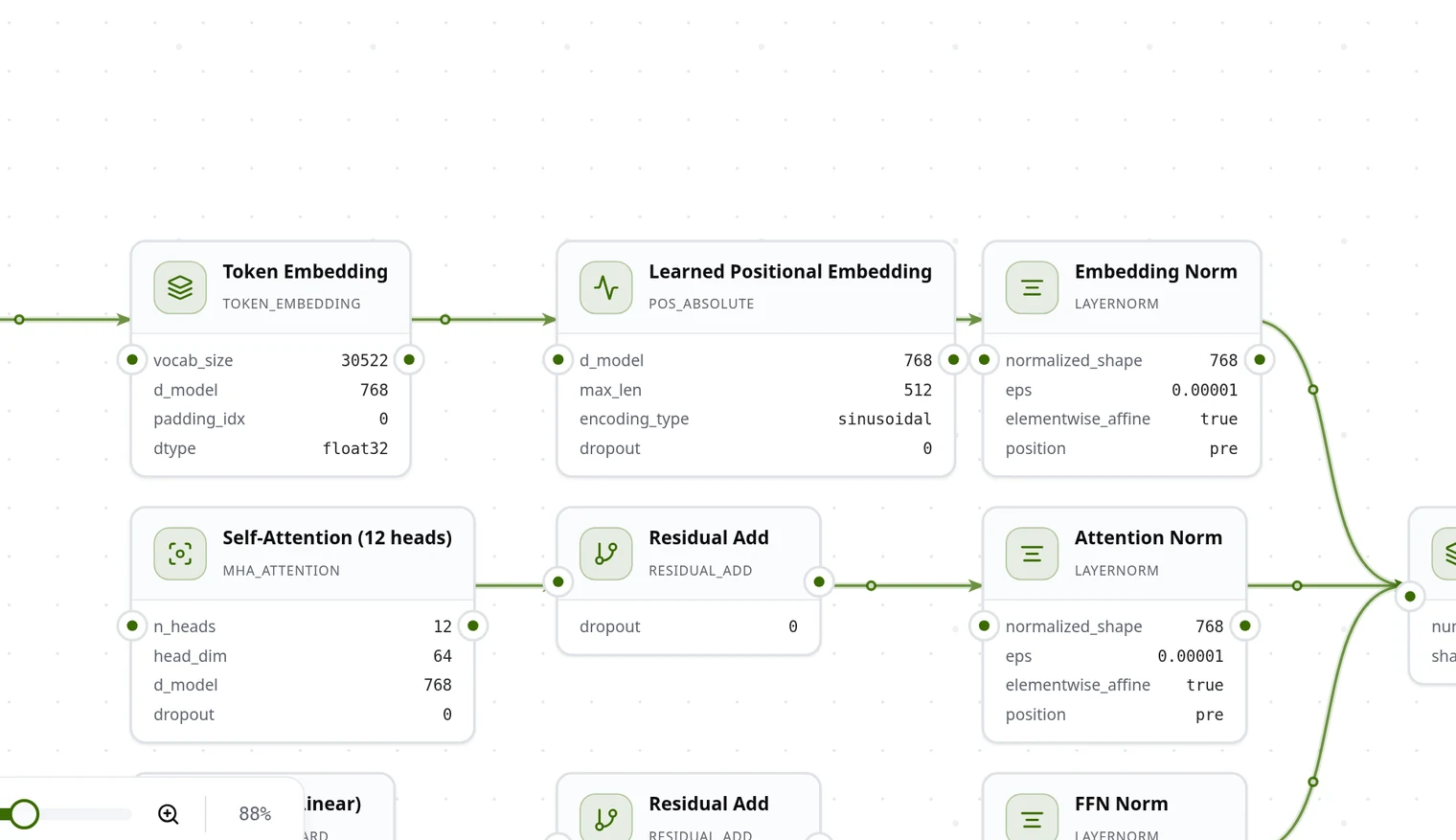
01
Design the model
Lay out the architecture and inspect its blocks before execution.
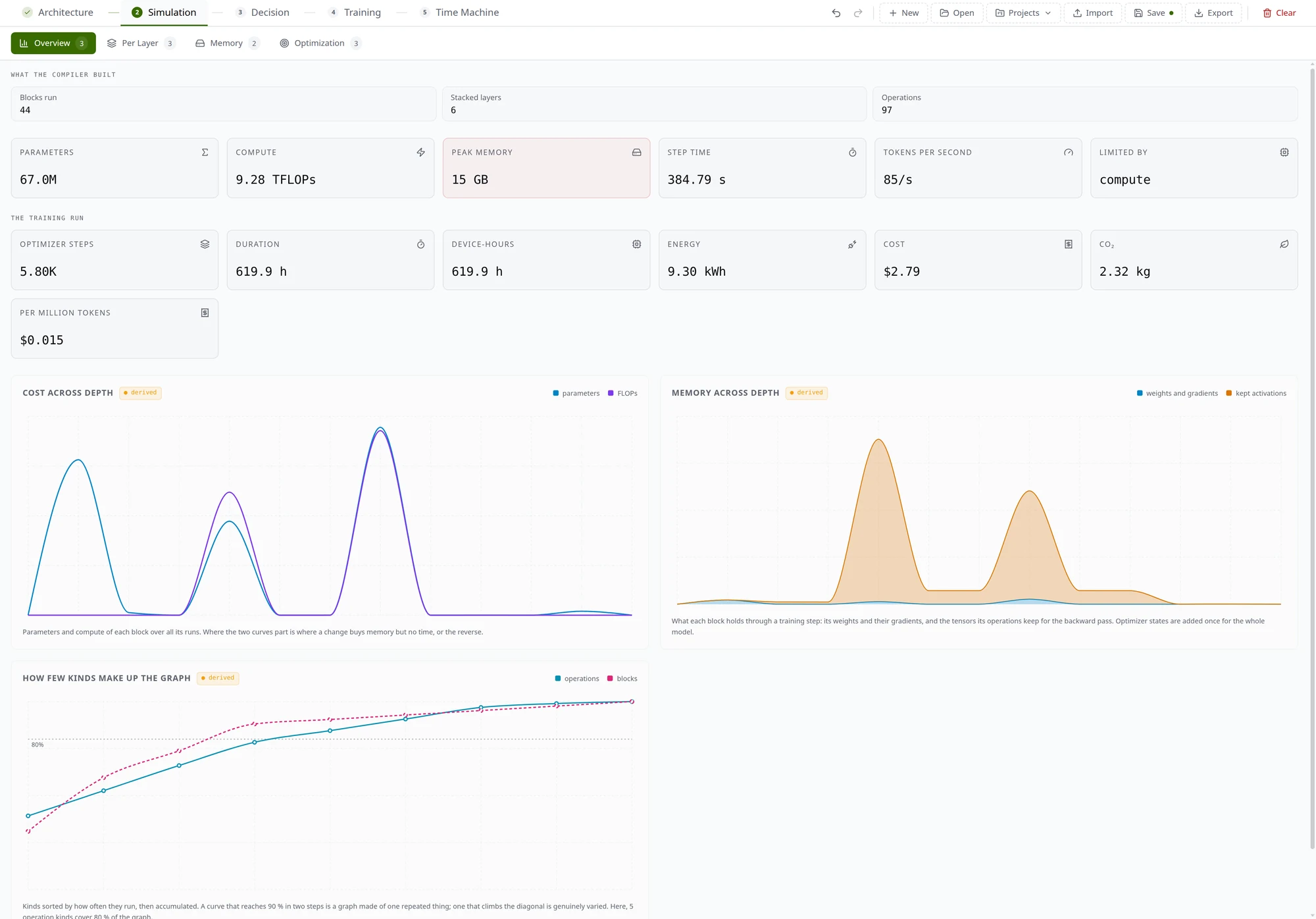
02
Compare resource estimates
Use per-layer and memory views to locate what drives the estimate.
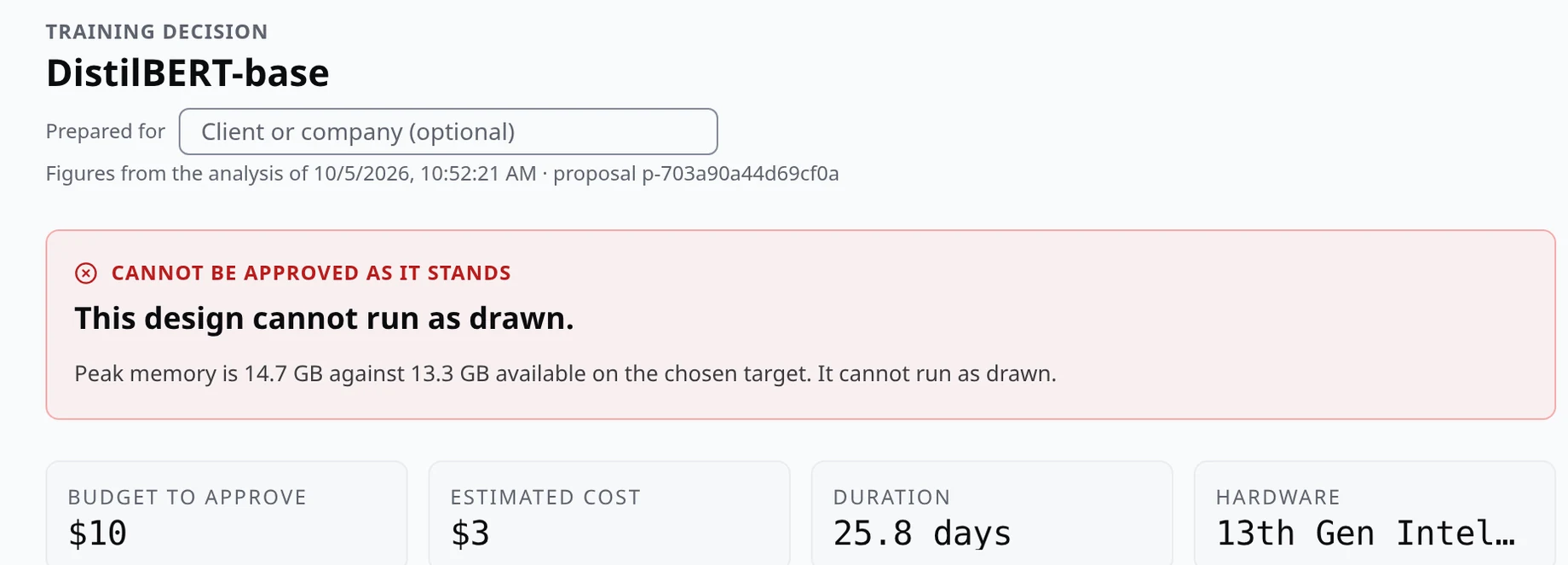
03
Keep a human decision
See a design that does not fit the selected machine and the reason it cannot be approved as proposed.
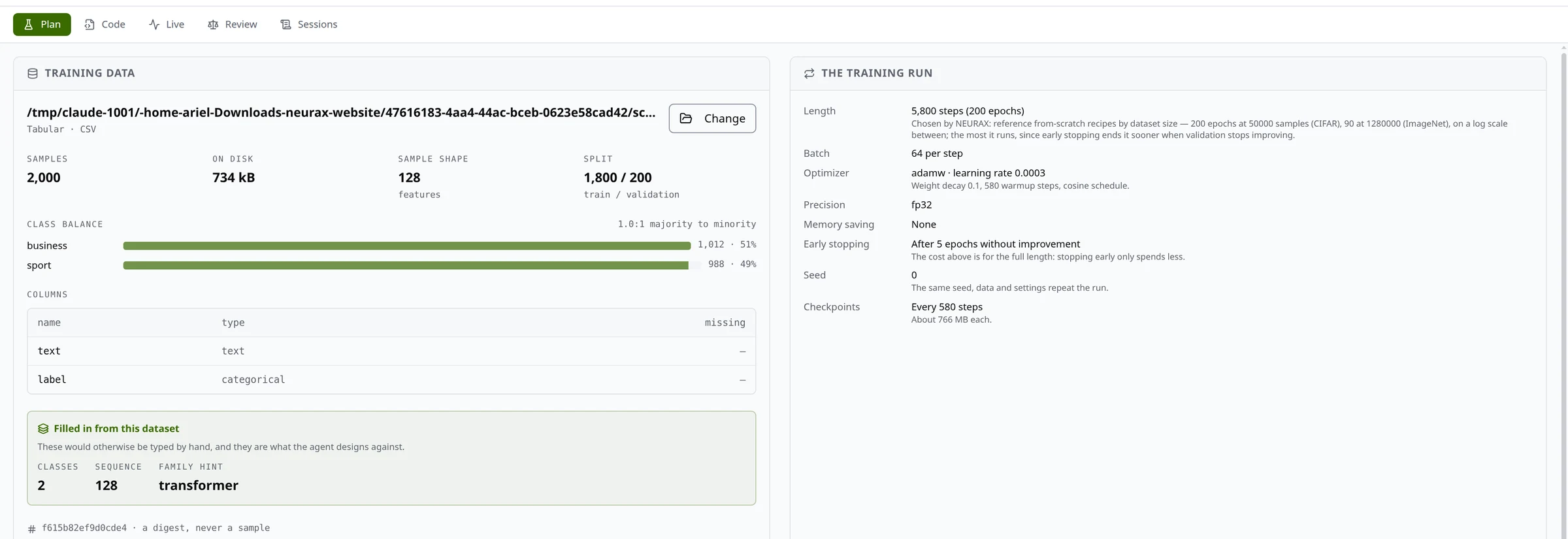
04
Review the training project
After approval, inspect the generated training project and the outputs of a run.
In the working day
A practical boundary for data sovereignty
Local execution gives a team more control over its files and machine, but sovereignty also means knowing which optional services are involved.
- Data and training
- The supported dataset is selected from the local machine and read there. Remote S3, Google Cloud Storage and Azure sources, and remote cloud training, are currently unavailable in the Studio.
- Public model imports
- Importing by public Hugging Face or ModelScope ID/URL makes an online request for the supported model configuration. The Studio reconstructs and analyzes its architecture, but this path does not download checkpoint weights.
- Optional AI provider
- Studio analysis does not require an AI provider key. If a team uses the optional Agent, the configured provider receives the prompt and project design/profile context; NEURAX says it does not send raw dataset contents or the local path. The provider may process or log requests under its own terms, and its usage charges apply.
- Files the team owns
- The project, Decision record and run outputs are stored locally. Exported artifacts can be reviewed and handled by the institution's own engineering and governance process.
NEURAX Studio
What a meeting can review afterwards
A useful conversation should leave more than a verbal estimate. Depending on the workflow, the team can inspect:
- The architecture and settings saved in the project.
- The dataset profile, target, split, integrity notes and fingerprint used for the proposal.
- The Decision brief, estimated budget, known unknowns and the human approval reason.
- Run-specific progress, validation metrics, logs and checkpoints, when a run is available.
- The exported model/project files and weights for review outside NEURAX.
Resources · Use cases
What to plan for today
NEURAX is useful for model design, hardware-aware analysis, planning and carefully scoped local pilots. Make these current limits part of the plan:
- Training is still in active development and is not yet stable; validate it on a small, non-critical pilot before depending on it.
- The current target is the local machine. Cloud data sources and cloud training are disabled.
- Hugging Face and ModelScope imports bring a supported published architecture onto the canvas for inspection and analysis, not its learned checkpoint weights. A training run from that imported design does not fine-tune the published checkpoint.
- Fine-tuning published checkpoint weights is not yet available through the Studio UI. The Agent can help draft and check a design, but its broader workflows remain in development; verify its visible results yourself.
- The Studio does not connect to university, CRM, ticketing, factory or deployment systems; customer teams handle those integrations and production review.
- Time Machine projects training, not inference/serving; cost, duration, energy and carbon depend on the assumptions entered. Missing inputs remain unknown, and listed compliance items need expert applicability review.
- A validation score is evidence for that run and split, not a guarantee of future performance.
Resources · Use cases
Bring one real workflow to a Studio walkthrough
Choose a dataset shape, a task and the machine you want to use. We can walk through what NEURAX can verify today and where your team would need a separate process.